[flagallery gid=11 name=Gallery]
— Inga
[flagallery gid=10 name=Gallery]
Here are old and more recent movie magazine covers depicting Errol Flynn from the USA, GB and Australia in chronological order.
— Inga
Ah! Yes – the sons-in-law of Errol! I don’t think we ever touched that subject!
So who knows what – about these two lads?
Beautiful model Arnella Flynn, very much looking like her mother Patrice Wymore married Carl Stoecker – Fashion Photographer extraordinaire (aka Karl Stöcker, Karl Stoecker) but when?
We do know that Errol’s grandson was born in Jamaica under the name of Luke Stoecker on August 21, 1975 as the only child of his daughter Arnella Flynn (1953-1998) and fashion photographer Carl Stoecker.
Question: when did they get married and when did it end? And why?
Now there is another Ms. Stoecker on the scene here, wife of Carl with daughters in this article below.
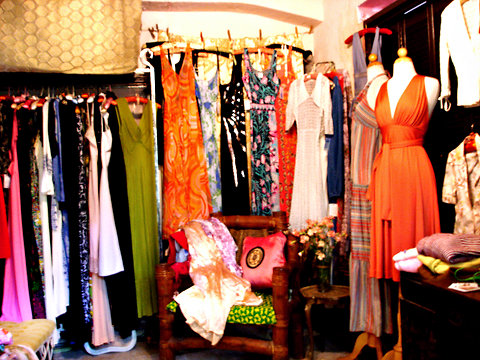 Posh Vintage in Miami Beach.
Patti Stoecker is a hoarder, the rarefied kind. In the 1980s, Ms. Stoecker, then a model, used to party all night at the Mudd Club, wearing, as often as not, one of her mother’s silky old slips. By the early ’90s, she had begun collecting her own ’40s-era variations, amassing them by the score and tie-dyeing them on her stove top in Easter-egg hues. For a time she consigned her slinky designs to local secondhand shops, but before long she was selling them from her house, against a dreamy backdrop of mottled peach-tone walls.
“I had hundreds of slips hanging here,” Ms. Stoecker recalled. “It came to the point that I couldn’t keep making them. I just couldn’t go into my kitchen and boil up another batch of fuchsia or blue.”
A self-described “natural enthusiast,” she was quick to adopt a new passion, snapping up vintage fashions on her travels and scattering them throughout her house. Filmy Ossie Clark gowns, ’50s Pucci jersey T-shirts, ’80s Givenchy silk dresses and punchy floral-patterned ’80s tunics have all found a home in Posh Vintage, – Read > Patti Stoecker – Owner < ALL About Here – her “showroom,” a revamped storage space that once housed her weed whacker and little else. Other treasures, including vintage rock ’n’ roll tees, Holly Harp and Biba designs, are strewn on sofas, suspended from walls or stowed in cartons on an upper floor.
A tireless researcher, Ms. Stoecker can wax encyclopedic on the romantic attributes of a ’70s Jean Muir jersey dress or Thea Porter caftan. “You gain such an interest in these things that you learn everything you can about them,” she said. Her eclectic enthusiasms extend as well to photographing Miami interiors (an image of Morris Lapidus’s baroque-modern Miami Beach residence is framed on one wall) and to collecting gilt-embellished Florentine nesting tables and paperback novels by F. Scott Fitzgerald, whose melancholy fiction she devours.
Clients and curiosity-seekers craving a glimpse of her fashion archive must pass through a garden — more like a rainforest, really — to reach the concrete 1920s house where Ms. Stoecker lives with her daughters and husband, the fashion and rock photographer Karl Stoecker, who will likely offer a visitor a glass of Pernod to help her settle in.
“I call this place a showroom, but it isn’t really,” Ms. Stoecker said. “This is a personal business to me. I don’t actually expect anybody to come here to buy anything.”
But buy they do, clients who have included Nicole Richie, Mia Farrow and the writer Lena Dunham, making appointments to view the collection firsthand or ordering from her Web site, poshvintage.com…, or from 1stdibs.com…, where covetable pieces from Geoffrey Beene, Bill Tice, Donald Brooks and Pucci fetch prices in the hundreds.
“Over the years I have collected the gamut,” Ms. Stoecker said. “Every ’50s jersey moment, the best of little ’60s Courrèges coats and every little ’90s slip dress.” Recently she has noticed a stepped-up demand for vintage Dior, Valentino and Versace, she said, though not necessarily the raucously colorful signature pieces inspiring a forthcoming Versace-H&M collaboration. “Not everybody wants to parade around in bright medallion prints,” Ms. Stoecker said. But a sinuously curved black dress is something else. “People can still see the quality in it. They can still see the sexiness.”
I would say this is after Arnella and there are half-sisters of Luke? So anybody knowing what is what in this scenario ?
Here are some links about Carl Stoecker’s photography and more to be found in Google images! www.karlstoeckerphotography.com… scrapheap.info…
Luke’s IMDP www.imdb.com…
Then there is Gideon Amir, husband of Rory and Father of Sean Rio (Amir) Flynn. Now we know pretty much everything about Rory and her son Sean Rio Flynn but what do we know about Gideon Amir?
Here is a Bio on Sean Rio, which states that his father is a director/producer but no other details. Are there any more details known to anybody in our group???
Sean is the son of director/producer, Gideon Amir and Rory Flynn. He is popular for his role in Nickelodeons Zoey 101 as Chase Matthews. He appeared in the first episode of season 4 and in series finale of Chasing Zoey.
His career started as TV commercial model and doing small roles in television like MADtv and Sliders as well as casting in small films. When he was ten years old, he was the second choice of Hillary Duff to portray the role of her younger brother in Lizzie McGuire. In 2005 he was given a big break to be the lead actor in Zoey 101.
Apart form being model and actor, Sean also loves music. He plays guitar and has great skills as a guitarist, in fact, he is a band member in his school band.
Sean also composed guitar songs which are posted in You Tube. In August 2009 he released and EP where his two songs are included and is planning to out his debit album soon.
General Appearance
Birth Name : Sean Rio Amir
Other Name: Sean Flynn
Occupation: Actor, Singer
Height: 5’11′(1.80m)
Sean Flynn is the grandson of actor Errol Flynn. Read more: people.famouswhy.com…
Family extensions can be very interesting too!
— Tina
This is a shot of a FB page revealing the cover of Errol Flynn: an Illustrated Life Chronology forthcoming from Robert Florczak but a long way from completion! [flagallery gid=6 name=Gallery]
— David DeWitt
This page is our FAQ’s page: it contains information we have discovered about how use the blog, etc., and will contain answers to commonly asked questions!
HOW TO REGISTER FOR MEMBERSHIP:
Who can publish Posts on this blog? Members with Author Privileges. Authors are members you have been invited to become Authors by the Admin. Subscribers may publish comments. All comments are moderated twice at first to allow the admin to prevent spam postings.
Login with your Username and Password.
On the Dashboard select Posts from the links on the left hand side. Click Add New, or use the “+New” drop down menu from the black WordPress toolbar at the top of the Dashboard page and select Post.
The next page is Add New Post.
Add your article Title.
There are several links to help you format and add text as well as media. There are two views available: Visual and Html. Note: if you cannot paste text into the Post window, select Html, paste and return to the Visual view.
To add a picture, click the Upload/Insert camera icon.
You have several choices: From Computer. From URL. Media Library, or FIGA Gallery.
Browse and Upload images using one of two browser uploaders.
Select images from your computer, from an URL hosted somewhere else, from our Media Gallery (blog files) or chose an image from one of the FIGA Galleries.
From your computer, select a photo and click Open. A new window opens for the image’s properties. Fill in required fields.
Under Link URL you will see the image’s address. There is a File URL button and an Attachment Post URL. You can switch back and forth between the two using these buttons. The Attachment Post URL is the address to use if you want to list images in your post but not show all of them.
Use the Insert into Post button to add your image to the article body.
To re-size the image in the article body window, select it, and drag the corners.
Add text, and add links using the Link button above the text area. You can create links by highlighting text and using the Link button in the Visual tab or by using html code in the Html tab.
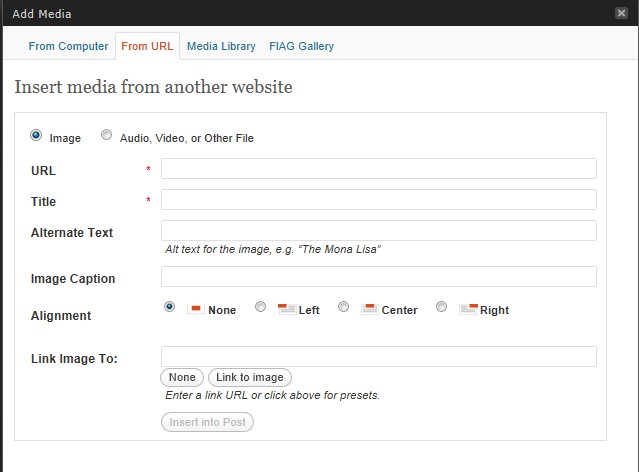
From URL, add in the address of the image (even one from our Media Gallery or FIGA Gallery), from Media Gallery, click Show, from FIGA Gallery select Show, to add the image to the article body window.
Due to current issues with posting not yet resolved, DO NOT SELECT MAIN PAGE in the category section to publish to the front of the blog. If you do not select any Category, the post will default to the front page. If you want the article in a category update it to include the categories you want it to appear in. This advice is in a state of flux until this issue is resolved further.
The Preview button is disabled. This is a bug in the theme we have activated.
Click the Publish Button to post your article. To the left of Edit Post on the next page, click View post.
Click the blog’s Name above the post on this preview page to go to the Front Page of the blog to see the post on the Main Page.
If satisfied with the publication, you are done.
If not, click Posts or All Posts in the sidebar to get to the list of posts. Hover your mouse over your article title to reveal links for editing.
Add text or make other changes to the post.
Now the Preview Button is active.
If satisfied, click Update.
Your published article is re-published with your changes.
For a zip file with screenshots in Word, Microsoft Works and PDF click here –
Yes! Highlight your text, then click the link button and in the next window put in your url!
In comments, you can use the code button to insert the link and text:
<code><a href=”url“>Link text</a> </code>
This is something we tried to prevent! However, doing so means the post will not show up in Recent Posts. So anything posted in any of our Main Categories, will, by default, also be published to the Front Page. It will also publish to the Category you selected for it, and be available for casual browser’s to discover. If you have a subject that belongs in a Category by all means publish it there so that readers can find it when browsing the blog! Selecting Main Page will publish to the Front Page of the blog. UPDATE! We have installed a plugin that excludes posts in all categories from appearing on the Main Page. You still need to tick Main Page when you post a new article on the blog!
Yes! We have added a simple plugin to allow images to be inserted into comments! The image may be hosted somewhere else or may be from our Library or Galleries. Just get its address (URL) and paste into the popup that you will now see if you click Add an image to comment: click here near the Comment Box.
If the published image is too large, in the Edit Comment window copy the URL of the image, delete the entire code you see in the editing window and replace it with this string of code:
<center><code><img src=”URL” Width= 200 Height=300 alt=”Text”/> </code></center>
Add your image URL and then change the Heigth = and Width= to smaller or larger numbers. Alt= may be a description of the picutre title or any text you wish to use such as a question for the reader! Alt text is intented to describe the image.
Preveiw comment, and click Update! You are done!
Here is a video tutorial: vimeo.com… (Thanks to Inga!)
To associate your new Gallery to a link on the blog you must create a new category, and make that new category the child of a parent category. Ask Admin for assistance. Your Gallery named New Gallery might become the child of the category Photos. It will then appear on the blog underneath the Photo category link on the Main Page once you republish the Gallery to both Photos and the name you gave your new child category “New Gallery”. Your posting will appear on the Main Page listed as published in Photos, New Gallery –
Yes, there is a way to attach photos. In the Add New Post window click Upload/Insert. You will be presented with a box with tabs above it. Choices are From Computer. From URL. Media Library. FIGA Gallery.
From Computer: you must upload the image. Afterwards, you see a box with options.
Under Link URL you will see a button called Attachment Post URL. Click this button and the url of the photo becomes the URL of its attachment address. Copy/Past this address into your post.
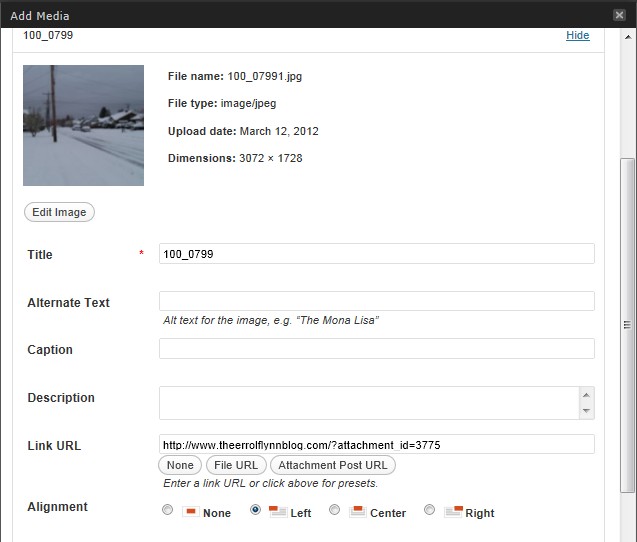
Image is selected by default. Url and Title are required. Your image can be hosted on another site using this option. You can also make the image into a link.
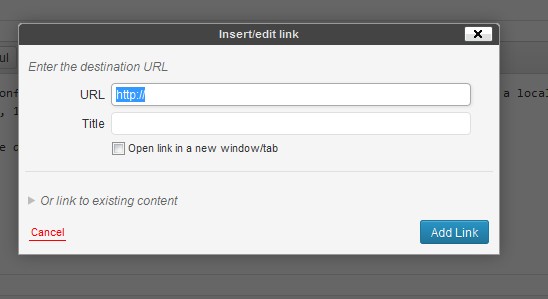
By the way, for everybody, did you know that you can make text links in your comments?
You can post a comment and then use the edit button to get into the Edit Comment page. On this page in the toolbar is a “link” button. This opens a popup that allows you to enter the long link you want to post, then use the Title bar to create a text link. Just click Add Link when you are done!
New Comment Box Editor:
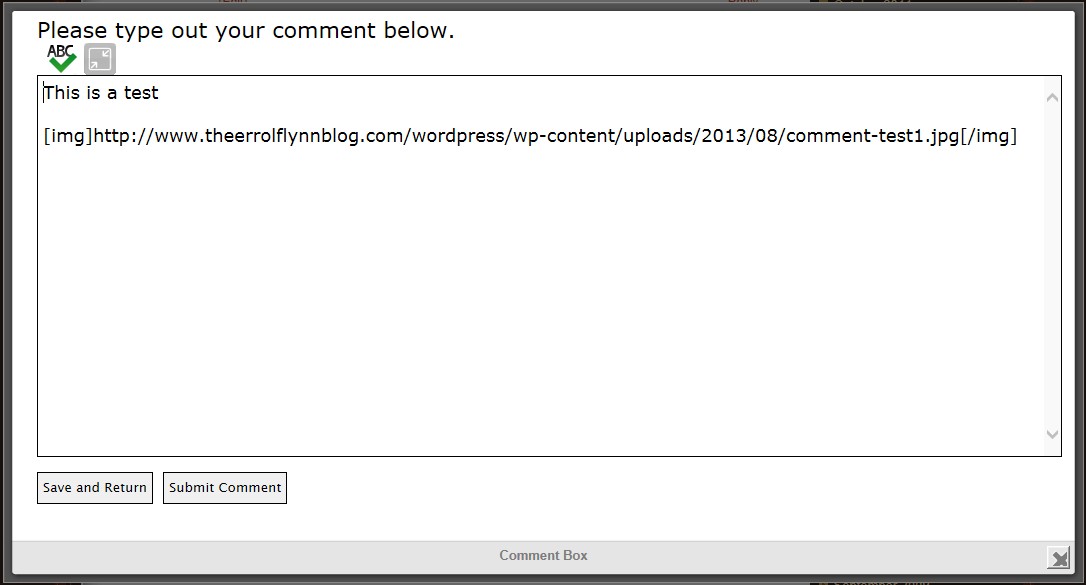
We have installed a new add-0n to the Comment Box that gives you new capabilities. It is recommended that you expand the comment box to take full advantage of them, AFTER YOU HAVE BEGUN YOUR COMMENTS.
If not, the “Save and Return” button will not function!
Use the Expand link to open the Comment Box after beginning your comments.
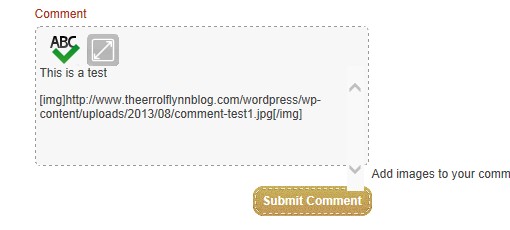
Finish Typing your Comments. If you want to add an image. You can do this before you expand the Comment Box or after you have used Save and Return for the first time. Adding an image will add the code needed to show the image into the Comment Box. Click Submit Comment.
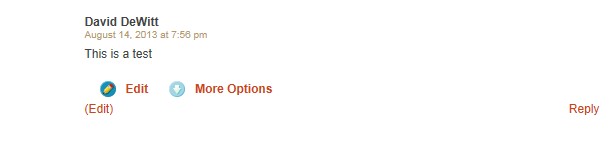
You will then see new Click to Edit or Delete links.
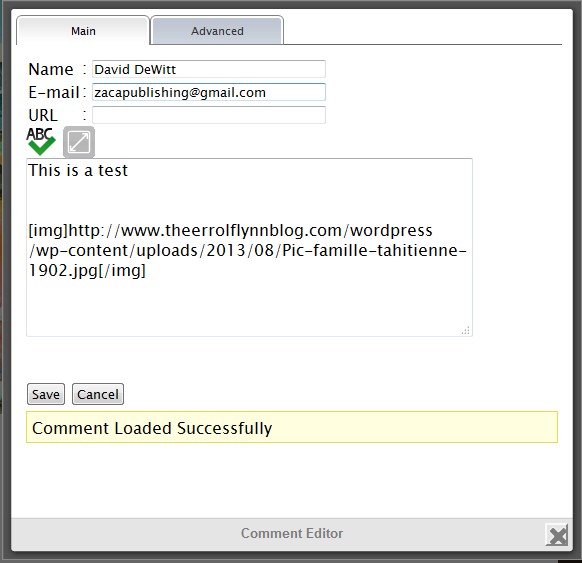
If you select Click to Edit a new window opens and you may edit your comments. Click Save. Your Comment is then re-posted. If you select Delete you will see this:
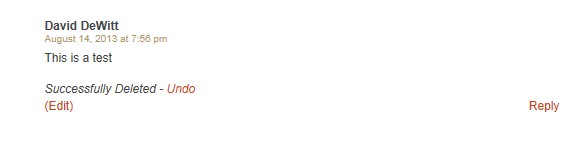
NOTE! You will see the Comment is still there! Just refresh the page and the comment will be gone!
_________________
This is the new home of TheErrolFlynnBlog.com…! It will be awhile before I am able to say I know how to run this horse and buggy, due to a technical problem with my ability to work on it for a few day before it went “Live” so please bear with me as I set things up and learn how they run… there will be a learning curve for all of us!
In the moment, I see that all Authors have been migrated to the Users section which is something I did not expect. However, all previously registered Readers do not appear in any list. I have added a Photo Gallery Plugin called NextGEN that I think will serve us well! This gallery has the ability to move photos between albums, for instance!
With any migration, things are not exactly as they used to be, or in the same place, necessarily. But much should look familiar!
There is an entirely new look, and a new posting window that includes a Visual tab and an HTML tab. I will be exploring what we can do here right along with you! We will undoubtedly be making some changes and trying to reset some things to reflect what they used to be, as well as moving in new directions. We have an anti-spam plugin that I need to become familiar with and for a time any post with more than 2 links in it may be moderated until I am able to set the plugin up the way it will work best for us. I have eliminated the need to give your name and email address every time you make a comment – which may or may not last if it welcomes a lot of spamming… I have new spam filters to play with, so it could get dicey up until I learn to set them up the right way. Please bear with me.
There is also the fact that most posts and comments pre-migration have “anonymous” attached to them! I may be able to fix this! For now, if you are a reader you will need to sign up again. Authors, I am adding email addresses to the login page for you. I am uncertain about passwords! That is how fresh this place is… I have just this moment started kicking the tires, myself!
Note: your first comment will be moderated! After that, you will be able to comment just by logging in! This is a feature of the blog that allows me to see who might be spamming us before they can leave a comment.
David
Admin/TheErrolFlynnBlog.com
— David DeWitt
Hello, everybody! We should begin to move the blog to our WordPress install during the next calendar week! I will let you know what happens next. Our present location will remain accessible until March 31st for use as reference for any work we may do to preserve attachements which will be lost on every post ever made here. It is unfortunate but this is what would happen no matter where we moved the blog to.
There are some very valuable attachments on this blog and I hope that we can save them!
I will explain how to reach this blog after we are moved. But moving alone isn’t the end of the work that must be done. All of our galleries, as I understand it, will become posts in the new location. So these will have to be reorganized into galleries.
We will lose all names associated with comments and posts, too, I believe. Horrid. But unavoidable!
These can be added back in, a painstaking process.
And we will lose all memberships! Each of you will have to sign up again at the new location. That shouldn’t be much of a problem.
The migration takes a couple of days to finish. I will keep everybody posted about what is going on but if the blog seems to be down or missing this weekend it is likely because it is in this transition period. I do not yet know what domainmonger will tell me is the url of our current blog after the transfer – our domain name is also being transferred.
You may see a temporary site if you type in the name of our blog at some point next week!
I will have to redo all of our settings in the control panel. And take advantage of some new things we will be able to have running at our new location. There are a lot of plugins available to WordPress users!
We knew this was coming for a long time and finally, the day is fast approaching…
I know we will pull together and go on our merry way after this is transition is finished!
Hugs, d~

— David DeWitt